


Hello, how can we help you ?
Rich product documentation and User Guide tutorial guide you to get started quickly


Rich product documentation and User Guide tutorial guide you to get started quickly
Step 1
Step 2
Open Firefox browser
1.Open the browser, click "Menu bar" - "Settings" in the upper right corner.
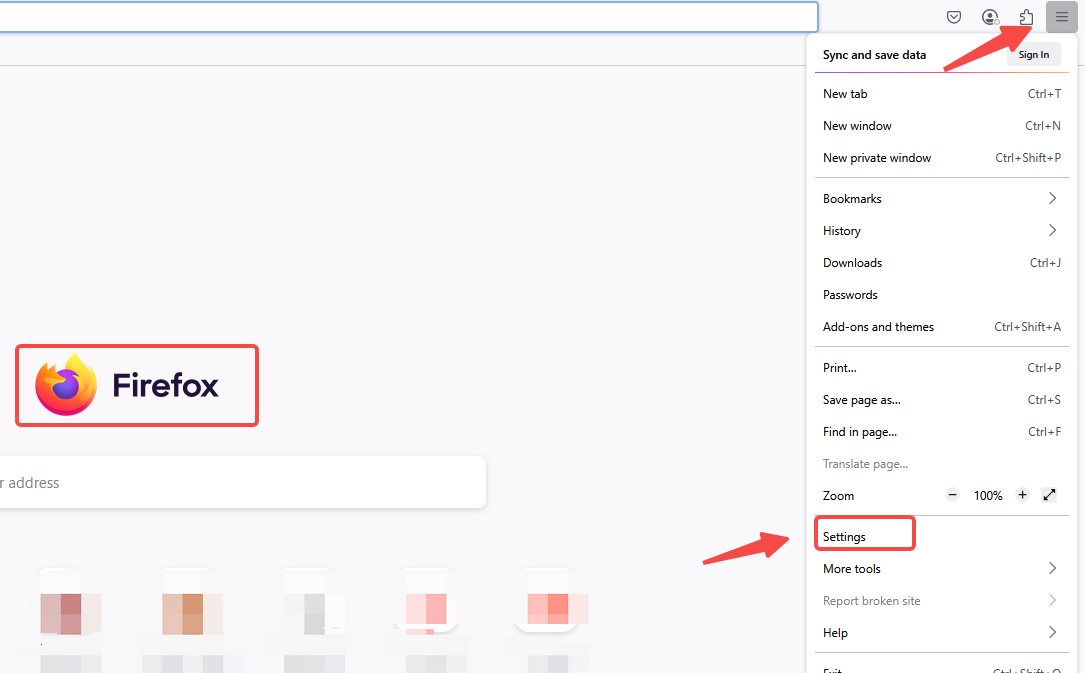
2. Find the "Network Settings" module in the dialog box and click "Settings".

3. Select "Manual Settings" and fill in the obtained proxy IP address and port in the dialog box.

4. Check "Proxy DNS when using socks v5" and confirm.

5. After completing the above steps, the proxy is successful.


No more

 English
vmoscloud XCrawl whoer MuLogin Antidetect Browser VMLogin Antidetect Browser Buyaacc BEWISER1 zvcard FoxPhone Cloud Phone
CLOUD BRIDGE INFORMATION TECHNOLOGY CO.,LIMITED @ 2022 All Rights Reserved


