


Здравствуйте, чем можем помочь?
Богатая документация по продуктам и руководство пользователя руководство руководство для вас, чтобы начать быстро


Богатая документация по продуктам и руководство пользователя руководство руководство для вас, чтобы начать быстро
Step 1
Step 2
Add proxy settingsAdd Proxy > Server Name > Server Address > Server Port > Server Type > Save
1. Fill in the server name (optional name)
2. Fill in the local proxy address and server port
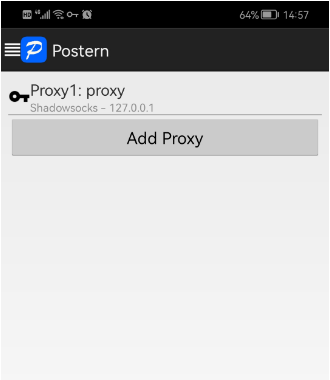
3. Click on the proxy type and select SOCK5
4. Click "Save" to access the target program normally\n\n


No more

 Русский
vmoscloud XCrawl whoer MuLogin Antidetect Browser VMLogin Antidetect Browser Buyaacc BEWISER1 zvcard FoxPhone Cloud Phone
CLOUD BRIDGE INFORMATION TECHNOLOGY CO.,LIMITED @ 2022 All Rights Reserved


